A name can be missing from a Concept2 board while the workout is already sitting in the online Logbook. Re-entering the same metres does not tell you which check failed.
Why is a logged workout missing from a Concept2 challenge board? Work through five checks in order: the Logbook row, which board is open, signup and privacy, the counting rule for that board, then the deadline. Concept2’s Logbook FAQ says an individual challenge needs no signup, a team challenge needs both a team and Join Team Challenge, and a team appears on the standings only with at least two active members. The Fall Team Challenge page, read on October 11, 2026, had already passed its September 30 enrollment deadline. Logging more metres does not reopen a closed signup.
The five-step order is our checklist. Each fact inside a step comes from Concept2’s Logbook FAQ, the Challenges page, or the Fall Team Challenge page, all read on October 11, 2026. This page starts only after the workout is in the online Logbook. It does not recover monitor memory, upload a file, or set a training plan. If you are counting a relay on your own sheet rather than on a Concept2 board, use the charity challenge counting steps instead.
Quick specs
| Item | What the source says | Why it changes the search |
|---|---|---|
| Where this check starts | A workout already in the online Logbook | A missing log row is a different problem |
| Individual challenges | No signup. Logged results count automatically (Logbook FAQ) | Do not look for a join button that the FAQ says is not required |
| Team challenges | Join the team, then Join Team Challenge (Logbook FAQ) | Membership alone does not put metres on that challenge |
| Team on the standings | At least two active members, each signed up and with metres entered (Logbook FAQ) | A one-person roster stays off the team list |
| Annual Meters Honor Board | Average per day since May 1. Under 1,500 is not listed (Logbook FAQ) | A season total is not the same figure as a daily average |
| Fall Team Challenge enrollment | Tasks due September 30, 23:59 GMT / 19:59 ET (FTC page) | Past on the day we read the page |
| Fall Team Challenge metre entry | October 18, 23:59 GMT / 19:59 ET (FTC page) | Still ahead on October 11, 2026, and only for people already enrolled |
Name the board before you search
The Challenges page puts several lists on one screen. A search on the wrong list looks like a missing total.
| List | What Concept2 says it shows | Signup |
|---|---|---|
| Annual Meters Honor Board | Average metres per day since May 1, in five bands. The link is on the Challenges page (Logbook FAQ). The Challenges page also calls it the total metres for the current season and says you must have rowed or skied at least 1,500 m per day combined. | Not a separate signup |
| A named challenge honor board | People who met that challenge. The metre number is on that challenge’s own page, not one number for every event. | Individual challenges: none. Team challenges: team plus Join Team Challenge |
| Team standings | Teams in the Virtual Team Challenge (Jan 1–Jan 31), World Erg Challenge (Mar 15–Apr 15), or Fall Team Challenge (Sept 15–Oct 15), the three team challenges named in the FAQ | Join Team Challenge for that event |
| Affiliation Standings | Year-round totals for one club or university group, reset each May 1. The FAQ says this is not a team. | Affiliation tab on Edit Profile. One affiliation at a time |
| Workout of the Day board | That day’s workout. The Challenges page says a result set from ErgData appears on that honor board. | Not this check |
On October 11, 2026 the Challenges page listed the Fall Team Challenge, September 15–October 15, under Current Challenges. Use the Fall Team Challenge page for its counting rules. Do not copy those rules onto the annual board or onto another named challenge.
Skeleton Crew uses a different counting rule. The Skeleton Crew counting worksheet applies that page’s October 25 to October 31 window, the 31,000 and 10,000 meter lines, and the BikeErg half-count.
Common mistake: Looking up a team-challenge total on the Annual Meters Honor Board. One is a dated event. The other is an average since May 1.
Takeaway: Copy the heading of the list you have open into the captain sheet before you check a name.
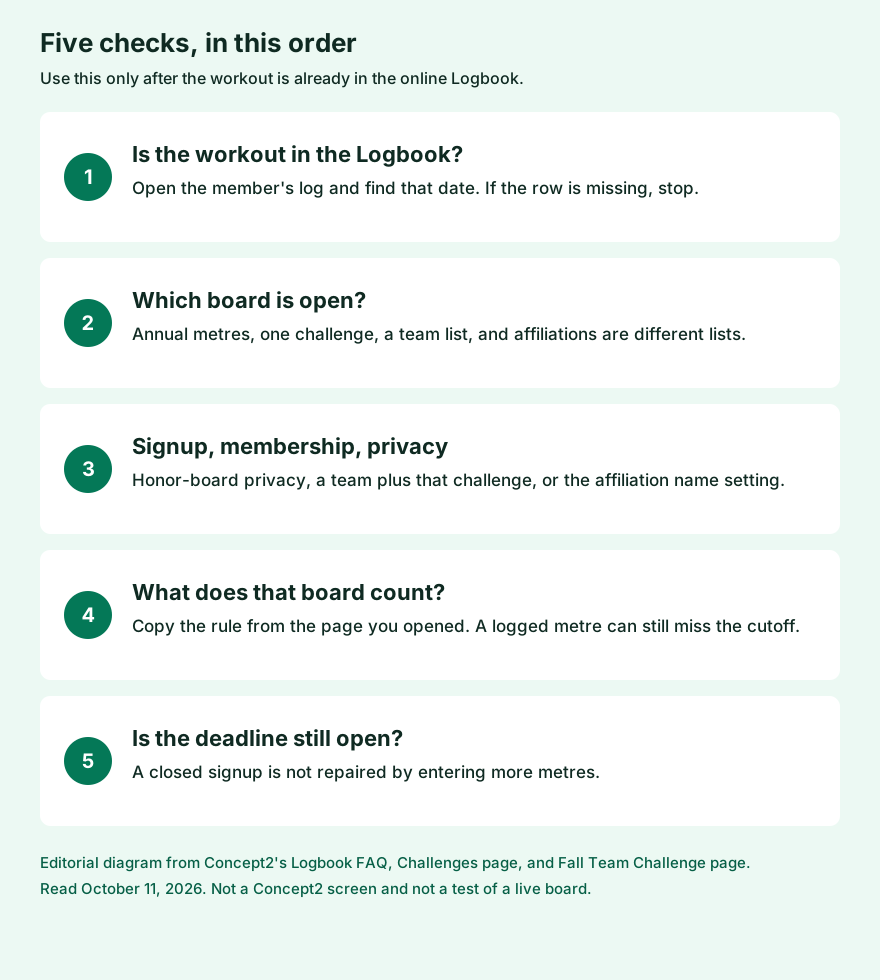
Five checks, in this order
Stop at the first step that fails. Later steps do not explain a miss that an earlier step already accounts for.
| Step | Question | Stop when |
|---|---|---|
| 1. Logbook row | Is this workout on the member’s online log for that date? | The date is not there. Entering the workout is a separate task. This page does not cover monitor memory or uploads. |
| 2. Which board | Does the heading match the event: annual metres, one named challenge, team standings, or affiliation standings? | You are on a different list. Search the list that matches the event. |
| 3. Signup and privacy | For a challenge board, is Appear on Honor Boards checked? For a team challenge, did they join the team and the challenge? For affiliation standings, is the name allowed to show? | The setting is off, or the team join or the challenge join is missing. |
| 4. Counting rule | Do the logged metres meet the rule written on that board’s page, including any machine adjustment that page states? | The log total and the challenge total are different numbers, or the total is under the line that page sets. |
| 5. Deadline | Was signup still open when they joined, and is metre entry still open if the page names an entry deadline? | Signup has closed. More logged metres do not enroll them. |
The Logbook FAQ names these places:
| Check | Where the FAQ says to look |
|---|---|
| Appear on honor boards | Edit Profile, then Privacy Settings. The box is labeled “Appear on Honor Boards”. |
| Challenge certificates if the name is hidden | The same FAQ note: hiding the name still leaves the person eligible for certificates and prizes. |
| Join a team | Teams page, Join A Team drop-down, then Select Team. Or Start A Team on that page. |
| Join that team challenge | After the team join, the Join Team Challenge button on the Teams page. The FAQ says you sign up to each team challenge separately. |
| Affiliation, not a team | Edit Profile, Affiliation tab, then Update. |
| Affiliation name hidden | The FAQ uses a second label here: “Show Name in Honor Board and Standings” set to No. That person is left off the Affiliation Standings, and their metres are not counted in the affiliation total. |
| Managed account | Team Captain page, Create Managed Account. The FAQ says this adds the person to the roster and does not sign them up. Tick Enter, then Signup Managed. A Quick Meters field appears only after that. Repeat for each team challenge. |
The privacy labels are not the same sentence. “Appear on Honor Boards” is in the challenge answer. “Show Name in Honor Board and Standings” is in the affiliation answer. Check the label that matches the list you opened. This page does not claim they are one checkbox.
Common mistake: Treating a managed account on the roster as signed up. The FAQ splits those into two actions, and the second one is per challenge.
Takeaway: Write down which label you checked. A challenge-board miss and an affiliation-standings miss are not the same finding.
Counting rules that leave a logged workout off the board
Annual metres
The Logbook FAQ says the Annual Meters Honor Board lists rowers by average metres per day since May 1, the start of the logbook season. The season runs May 1 to April 30. The bands are:
| Average metres per day | Listed |
|---|---|
| 10,000 or more | Yes, in that band |
| 7,500–9,999 | Yes |
| 5,000–7,499 | Yes |
| 2,500–4,999 | Yes |
| 1,500–2,499 | Yes |
| Under 1,500 | No |
The FAQ’s own words are “7500–9999”, “5000–7499”, “2500–4999”, and “1500–2499”, and “an average daily meters of less than 1500” is not listed. The Challenges page, on the same day, said the board “shows the total meters for the current season” and that you “must have rowed or skied a combined total of at least 1500m per day.”
Those sentences do not say how many days to divide by, and they do not say whether BikeErg metres are inside the annual average. The Challenges page names rowing or skiing for that 1,500 m line. Do not invent a BikeErg rule for this board. Do not treat a season sum of 1,500 as the cutoff the FAQ describes.
A named individual challenge
The FAQ says any result entered or uploaded into the online logbook counts, and that you must have completed “the correct number of meters.” That number is on the challenge page, and it is not one number for every challenge. If the log shows fewer metres than the page requires, the name can be absent while the log row is real.
Team challenges, and the Fall Team Challenge in particular
The FAQ’s team rule is general: at least two active members, and an active member has signed up and entered metres. The Fall Team Challenge page adds its own counting rules. Read on October 11, 2026, they were:
- The team window is 12:00 a.m. September 15 through 11:59 p.m. October 15. The page does not name a time zone for those two clocks.
- Only Concept2 RowErg, SkiErg, and BikeErg metres count. On-water and on-snow metres do not.
- BikeErg metres “are counted as half when applied to the challenge.”
- A team is not the club affiliation on the profile.
- Team members “will not appear on challenge boards until at least two people are taking part.”
- Anyone who completes either 100k or 200k is eligible for a certificate, an optional shop purchase whose availability varies by country, and inclusion on the Fall Team Challenge Honor Board. The Challenges page describes the same event as each member trying to reach 100,000 or 200,000 metres.
Worked example, with assumed inputs, not a real team: 40,000 RowErg metres and 20,000 BikeErg metres. Half of 20,000 is 10,000. The challenge total is 50,000. Both 100,000 and 200,000 are higher than 50,000, so this assumed total meets neither reward line on that page. Use the half-metre rule only where the Fall Team Challenge page states it.
Common mistake: Adding BikeErg metres in full on the Fall Team Challenge because the log shows them in full. The challenge page applies a half count. The log display does not.
Takeaway: Copy the counting sentence from the page that owns the board. A logbook total and a challenge total can both be right and still disagree.
Deadlines that more metres will not reopen
The Logbook FAQ says team-challenge signup lasts “roughly 16 days,” and that the exact deadline is on that challenge’s page. If you have not signed up by then, “you are not able to take part.” Joining a team after the signup deadline does not put you in that challenge. Leaving a team at any point means your metres “will no longer count for that team.”
The Fall Team Challenge page states two different clocks:
| Clock | What the page says | Status on October 11, 2026 |
|---|---|---|
| Enrollment | Finish these tasks by September 30, 23:59 GMT (19:59 ET), or the team is not enrolled and members’ metres do not count: every member added, and members with their own logbooks marked as participating | Already past |
| Entering metres | October 18, 23:59 GMT (19:59 ET) | Still ahead |
| Weekly habit | Metres completed each week “should be entered no later than midnight on Friday.” The page calls this an honor system and does not name a time zone | A request, not the enrollment deadline |
| Incentives note on the Challenges page | Certificates and other incentives “will be available on the Teams page after September 30 23:59 GMT (19:59 ET)” | Same clock time as enrollment, different sentence. It does not extend signup |
Someone already enrolled can still enter metres until the October 18 deadline. Someone who missed September 30 is not enrolled by those later entries. The page also says Concept2 will not take results by phone, fax, or email.
Creating a managed account after the signup deadline does not create an exception the FAQ forgot to mention. The FAQ says a person who joins after the deadline cannot take part, and that a managed account still has to be signed up for that challenge.
Common mistake: Seeing an October 18 entry deadline and using it as a second enrollment date. On the Fall Team Challenge page, entry and enrollment are different sentences.
Takeaway: If step 5 fails, write “signup closed” on the sheet and stop. Do not re-enter the metres as a workaround.
Captain record sheet
Copy this table once per person per board. Leave the result cells blank until you have the live page open. Do not fill them from memory of a different challenge, and do not put a date of birth, email, or other private profile data on a shared copy.
| Field | What to write | Result |
|---|---|---|
| Date of this check | The day you looked | |
| Board heading | Paste the heading of the list you opened | |
| Workout date in that person’s online log | Yes or no. If no, stop at step 1 | |
| “Appear on Honor Boards” | Checked or not checked. Challenge lists only | |
| “Show Name in Honor Board and Standings” | Yes or No. Affiliation Standings only | |
| Team joined | Yes or no. Team challenges only | |
| Join Team Challenge | Yes or no. Team challenges only | |
| Active members | How many have signed up and entered metres. Under 2, the team stays off the standings | |
| Counting rule | Paste the sentence from that challenge page | |
| Signup deadline | Paste it, and write whether it has passed | |
| Metre-entry deadline | Paste it if the page names one | |
| Will more logged metres fix this? | Yes only if the log row is missing, or the rule is a metre minimum and entry is still open. No if signup has closed |
What this page does not decide
- Ranked pieces, such as a single 2,000 m on the rankings, are a different list. The FAQ’s ranking rules are not repeated here.
- Monitor memory, USB or LogCard uploads, and which app can log a PM3 or PM4 are not in this check. If the monitor is a PM3 or PM4 and the date is still missing from the Logbook, compare the PM3 and PM4 logging options.
- The FAQ says challenge certificates can be downloaded for 30 days after a challenge ends, and that older certificates are not currently available from the site. This page does not retrieve them.
- The Fall Team Challenge shop is a third-party store, and the page says availability varies by country. No price is stated here.
- We did not sign in, submit a workout, or watch a name appear or disappear. The checks are the public instructions, not a live test.
- Rules and dates change. The September 30 and October 18 clocks are what the Fall Team Challenge page showed on October 11, 2026. Open that page again before you tell a team the window is shut or still open.
- Nothing here is a training plan or a health claim.
The cover image is an illustration of a generic indoor rower and a blank checklist. It is not a Concept2 screen, a customer photo, or a test. For a relay you score yourselves, the counting sheet sits in the charity challenge plan. Other rowing notes on this site are under indoor rowing.